C-Studio







⚠️ Development status: C-Studio is under active development. Features and interfaces may change.
C-Studio is an early-stage desktop application for inspecting chromosome-scale assemblies, comparing multiple evidence layers, and making user-directed AGP edits. The current application is built with Tauri 2, React, TypeScript, and Rust.
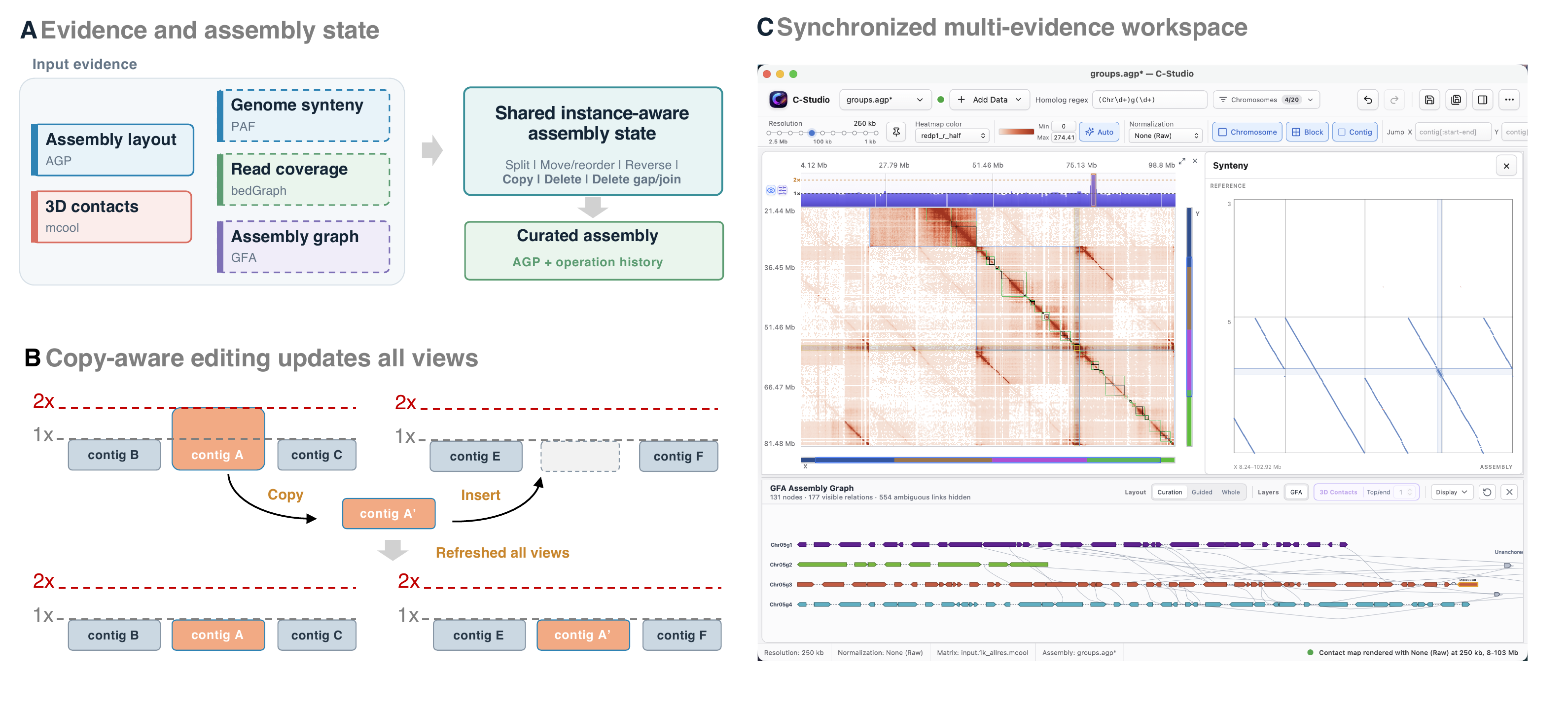
Figure 1. C-Studio combines AGP, 3D contacts, synteny, coverage, and assembly graph evidence in a synchronized, copy-aware curation workspace.
What C-Studio brings together
- AGP assembly structure and editable contig placements
.mcoolcontact maps- PAF synteny alignments
- BedGraph coverage tracks
- GFA assembly topology and optional endpoint-level 3D-contact evidence
- copy-aware selection, editing, history, undo, redo, and AGP export
- compatible operation-history sidecars saved alongside edited AGP files
flowchart LR
    A["AGP assembly"] --> W["Synchronized workspace"]
    B["MCOOL contacts"] --> W
    C["PAF synteny"] --> W
    D["BedGraph"] --> W
    E["GFA graph"] --> W
    W --> U["User-directed edits"]
    U --> H["History and validation"]
    H --> O["Edited AGP"]
Evidence and authority
The currently edited AGP layout is authoritative for ordering, orientation, boundaries, and export. Contact maps, PAF, coverage, and GFA are evidence views. They are synchronized with the edited layout but are not silently rewritten or allowed to decide an edit.
Start here
- Install or build C-Studio.
- Prepare AGP and evidence files.
- Follow the first project walkthrough.
- Review project file discovery before loading a real dataset.
- Read assembly editing before enabling auto-save or deleting copies.
The current limitations page distinguishes working features from packaging, platform, and validation gaps.